
Opencart Xampp Virtualhost Storage Klasörü Ayarı
<VirtualHost *:80> DocumentRoot “D:/Siteler” ServerName localhost ServerAlias www.localhost Alias /opencart/o3/storage “D:/Siteler/opencart/o3storage/storage” </VirtualHost>



<VirtualHost *:80> DocumentRoot “D:/Siteler” ServerName localhost ServerAlias www.localhost Alias /opencart/o3/storage “D:/Siteler/opencart/o3storage/storage” </VirtualHost>
Google+ hesabınızın profil ID’sini xxxx yazan yere ekleyip head etiketi içine şu satırı eklemeniz yeterli. < link href=”https://plus.google.com/xxxxxxxxxxxxxxxxxxxx/posts” rel=”author” />

setlocale (LC_ALL, ‘tr_TR.UTF-8’, ‘tr_TR’, ‘tr’, ‘turkish’); ile sayfa çıktısı ISO-8859-9 koduyla ekrana basılır. UTF-8 kodlu sayfada Türkçe hatasını önlemek için iconv(‘ISO-8859-9′,’UTF-8’,$donusturulecekyazi) kullan. Aşağıda Ay ve Günü ekrana …
print_r() ile alınan değişken ve değerlerini ekrana okunabilir yazdırmak için echo “<pre>”; print_r($query); echo “</pre>”; kodunu kullan.
catalogcontrollerproduct altındaki category.php dosyasındaki 30. Satırda başlayan if (isset($this->request->get[‘sort’])) { $sort = $this->request->get[‘sort’]; } else { $sort = ‘p.sort_order’; } kodunu aşağıdaki gibi değiştir. if …
#Alternate default index page DirectoryIndex index.php
xamppmysqldata klasöründeki silmek istediğin veritabanının ismindeki klasörü sil
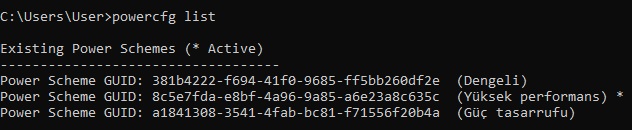
CMD yönetici olarak aç. komutu ile güç planlarını listele. Silmek istediğin güç planının kodunu aşağıdaki gibi yazarak güç planını sil.
Dos ekranının araç çubuğundan özelliklere gir. Düzenleme seçeneklerinden Hızlı Düzenlemeyi Modunu aktif et
[recent_post_slider design=”design-1″] kodunu şablon dosyasına gömmek için php echo do_shortcode(‘[recent_post_slider design=”design-1″]’);